
Curtiss King After Imagé – Echo & Reverb VST Plugin
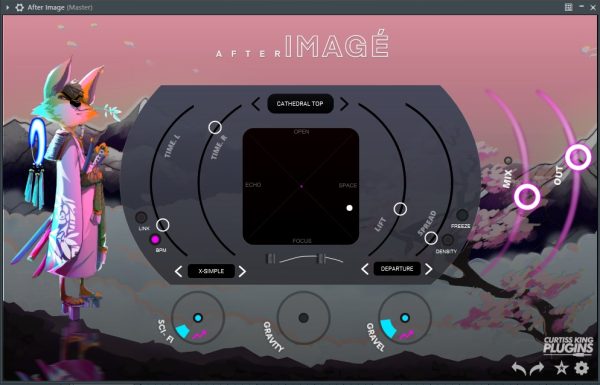
Curtiss King After Imagé is an echo and reverb plugin with a central XY joystick to morph between Echo and Space engines. Features independent L/R time sliders, BPM sync, Echo Navigator with feedback and texture presets, 3 global FX (Sci-Fi modulation, Gravity ducking, Gravel saturation), analog Lo-Cut and Hi-Cut filters, 200+ factory presets, and built-in achievements. VST2, VST3, AU. PC and Mac.
Original price was: $60.00.$30.00Current price is: $30.00.
Description
Curtiss King After Imagé – Echo & Reverb VST Plugin
Get Curtiss King After Imagé from VStor.me — an interactive echo and reverb plugin built around a central XY joystick that morphs continuously between a dedicated Echo engine and a Space (reverb) engine.
After Imagé’s core concept is spatial flexibility from a single control. Slide the joystick left for pure echo, right for pure reverb, and anywhere between for blended combinations. The vertical axis opens or focuses the stereo image. Three global FX modules — Sci-Fi chorus/phaser, Gravity ducking, and Gravel saturation — add further character on top of the core echo/space combination. A purple visualizer reacts to the dynamics of the processed signal in real time.
Buy Curtiss King After Imagé VST Plugin at a great price on VStor.me
Core Controls
- ✓ XY Joystick – morphs between Echo (left) and Space reverb (right); vertical axis controls stereo width
- ✓ Time Sliders – two curved sliders for independent L/R echo time control
- ✓ Link – connects both time sliders to keep L/R channels in sync
- ✓ BPM Sync – locks echo times to project tempo or frees them for off‑beat delays
- ✓ Echo Navigator – fast preset browser with different feedback and texture configurations
3 Global FX Modules
- ✓ Sci‑Fi – chorus and phaser modulation; intensity mode available
- ✓ Gravity – ducks the wet signal behind the dry signal to prevent mix clouding; extended mode available
- ✓ Gravel – analog grit and drive; intensity mode available
Output & Filters
Analog‑modeled Lo‑Cut filter (20 Hz to 1 kHz) and Hi‑Cut filter (20 kHz to 1 kHz). Mix Slider with Mix Lock to preserve wet/dry balance across preset changes. Output Slider with built‑in limiter at extreme settings.
Ready to Morph Your Echo & Reverb?
Experience intuitive spatial control with After Imagé’s unique XY joystick.
Presets & Additional Features
200+ factory presets with a full‑view browser. Favorite, group, search, and expansion import/export. Preset Navigator arrows for sequential auditioning. Full undo/redo history. Built‑in achievement system that rewards regular use.
System Requirements
- Mac: macOS 10.9 or later, 64‑bit. VST2, VST3, AU.
- Windows: Windows 7, 8, or 10, 64‑bit. VST2, VST3.
- RAM: 2 GB (4 GB recommended).
- Internet: Required for installation only.
- DAWs: Works in Ableton Live, FL Studio, Cubase, Cakewalk, Reaper, and any DAW supporting VST3 or AU. Pro Tools not supported.
More info: After Imagé official page
Why Choose After Imagé?
After Imagé gives you a hands‑on approach to echo and reverb that feels more like playing an instrument than tweaking parameters. The XY joystick lets you blend and shape effects in real time, making it perfect for live performance, sound design, and creative mixing. Whether you need subtle ambience or wild, modulated delays, After Imagé delivers with style and simplicity.
Ideal For:
- ✓ Live performers
- ✓ Sound designers
- ✓ Electronic musicians
- ✓ Mix engineers
- ✓ Ambient producers
- ✓ Anyone wanting intuitive spatial effects
Frequently Asked Questions
What does the Gravity module do?
Gravity ducks the wet (echo/reverb) signal downward whenever the dry signal is active, and lets it rise in the gaps. This prevents the wet signal from building up behind the dry signal and clouding the mix — useful on vocals, leads, and any source where you want the effect to be heard in the spaces rather than fighting the dry signal. The intensity mode pushes the ducking effect further for more pronounced pumping behavior.
Can I sync After Imagé to my DAW’s tempo?
Yes. The BPM button syncs the echo times to your project tempo, locking delays to rhythmic note values. Deactivate BPM sync to set echo times freely for off‑beat, ambient, or tempo‑independent delay effects.
Does After Imagé support Pro Tools?
No. After Imagé does not support the AAX format required by Pro Tools. It runs as VST2 and VST3 on both PC and Mac, plus AU on Mac. Compatible DAWs include Ableton Live, FL Studio, Cubase, Cakewalk, and Reaper.
What is the Mix Lock feature?
Mix Lock freezes your current wet/dry Mix Slider position so it stays constant when you switch presets. Without Mix Lock, loading a new preset resets the mix balance to whatever value was saved in that preset. With it active, you can audition presets while keeping your preferred wet/dry ratio unchanged.
How many presets are included?
After Imagé comes with over 200 factory presets covering a wide range of styles—from subtle echoes and room simulations to rhythmic patterns and experimental textures. You can also create, save, and organize your own custom presets.
Get Curtiss King After Imagé VST Today
Add intuitive echo and reverb morphing to your toolkit. Download now and start exploring.
Discover more creative plugins in our reverb and delay category, or browse our full collection of VST plugins for PC and Mac.